

Ocypus Sigma ES916: Elevate Your PC Setup with a Stylish Custom Display
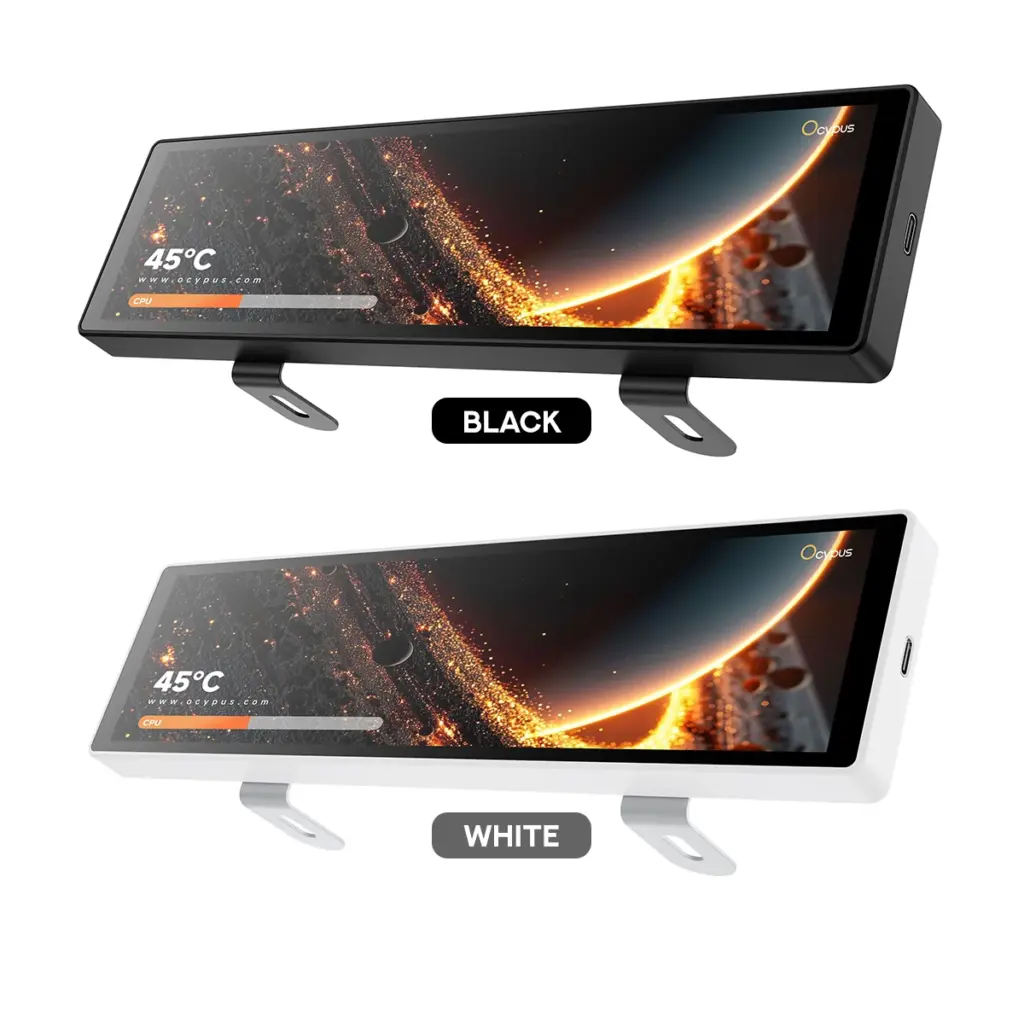
Ocypus Sigma ES916
When it comes to building a modern PC setup, performance is only part of the equation. A clean aesthetic, personalized design, and convenient access to information can make a desktop setup even more impressive. This is where the Ocypus Sigma ES916 comes in—a compact display designed to add a unique visual element to your PC build or workspace.
With its ultra-wide screen, customizable content, and flexible installation options, the Ocypus Sigma ES916 offers PC enthusiasts a creative way to personalize their setups.
A Compact Display with an Ultra-Wide Design
The Ocypus Sigma ES916 features a 9.16-inch IPS display with a resolution of 1920 × 462 pixels. Its distinctive ultra-wide format makes it an excellent addition to modern gaming setups, custom PC builds, and desktop workstations.
Rather than taking up space like a traditional monitor, the ES916 provides a slim display area that can complement your existing hardware. Its compact dimensions of 245 × 66 × 14 mm allow it to fit neatly into different setups without overwhelming the overall design.
Whether you’re building a minimalist workstation or a visually striking gaming PC, this display adds another layer of customization to your setup.
Personalize Your Setup with Custom Content
One of the standout features of the Ocypus Sigma ES916 is its content customization capability.
Using Ocypus Display software, users can personalize the screen with supported MP4 videos, GIF animations, and various image formats. This opens up plenty of possibilities for creating a display that reflects your personal style.
You can use it to showcase animated graphics, custom wallpapers, themed visuals, or other compatible content that matches your PC’s aesthetic. For gaming enthusiasts and PC modders, it provides another way to make a build feel more personal and distinctive.
Instead of leaving your PC looking like every other setup, the ES916 gives you room to experiment with your own visual ideas.
Designed for Flexible Installation
Not every PC setup is built the same way, and the Ocypus Sigma ES916 accommodates different installation preferences.
The display can be installed inside a compatible PC case or used as a standalone desktop display. Its mounting options include a metal stand and magnetic attachment, giving users more flexibility when deciding where to position it.
For PC builders, installing the screen inside the case can create a more integrated, custom-built appearance. Meanwhile, using it as a separate desktop display can be a practical option for users who want additional visual information without modifying their PC case.
Its black and white color options also make it easier to coordinate the display with different hardware themes.
A Clear and Vibrant IPS Panel
The ES916 uses an IPS panel, offering a wide-viewing-angle display experience that works well for viewing graphics and other visual content.
Its key display specifications include:
- Screen size: 9.16 inches
- Resolution: 1920 × 462 pixels
- Panel type: IPS
- Refresh rate: 60Hz
- Brightness: 400 cd/m²
The 60Hz refresh rate is suitable for displaying animations, images, and general visual content. Its 400 cd/m² brightness rating also helps keep displayed content visible in typical indoor environments.
While it isn’t designed to replace a full-sized gaming monitor, the ES916 serves a different purpose: adding a dedicated display area to complement your main screen and enhance your setup’s overall appearance.
Convenient Connectivity Options
Installation and connectivity are important considerations when adding another display to a PC.
The Ocypus Sigma ES916 supports two connection options: a motherboard 9-pin header or a direct USB Type-A connection. This flexibility can make integration easier depending on your setup and available connections.
Before purchasing, it’s worth checking your PC’s available ports and the manufacturer’s installation instructions to determine the most suitable connection method for your configuration.
Is the Ocypus Sigma ES916 Worth Considering?
The Ocypus Sigma ES916 is worth considering if you want to add a customizable display to your PC setup without investing in another full-sized monitor.
Its biggest strengths are its compact ultra-wide design, support for personalized visual content, and flexible mounting options. These features make it particularly appealing to PC enthusiasts, gamers who enjoy customizing their builds, and users who appreciate a more personalized desktop environment.
However, it’s important to remember that the ES916 is primarily a supplementary display. If your main goal is competitive gaming, extensive multitasking, or replacing your primary monitor, a conventional monitor will be a better fit.
For those who prioritize customization and aesthetics, the ES916 offers a different kind of value.
Final Thoughts
The Ocypus Sigma ES916 brings together a compact design, customizable visuals, and versatile installation options in one distinctive display. It provides PC builders and desktop enthusiasts with another way to express their creativity while adding a dedicated visual element to their setup.
Whether you want to showcase animated graphics, complement your PC’s design, or create a more personalized workspace, the ES916 is an interesting accessory to explore.
Sometimes, it’s the smaller details that make a PC build stand out—and the Ocypus Sigma ES916 is designed to help make those details count